
Summary: Pixeltable 0.6.5 ships a first-class pxt CLI for catalog operations and service deployment. Define your schema and computed columns in Python once; then use the terminal to list tables, peek at rows, inspect failed computed cells, roll back versions, emit machine-readable JSON for agents, and stand up FastAPI endpoints with pxt serve—no extra application code. A local daemon keeps commands fast (~40 ms after the first invocation), and --json output makes the CLI a stable interface for automation and AI assistants.
You Defined the Pipeline in Python. Now What?#
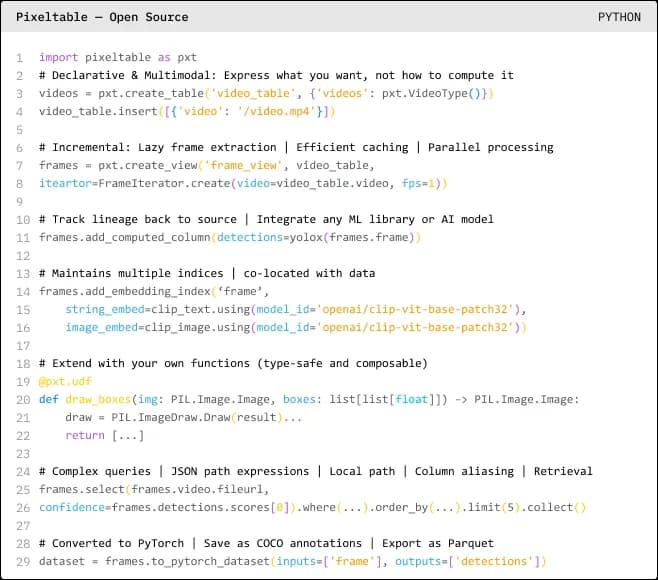
Most Pixeltable projects follow a familiar pattern: you create tables and views, attach computed columns for embeddings or LLM calls, add embedding indexes, and wire up @pxt.query functions for retrieval. That declarative Python layer is where the hard design work happens.
Then day-two operations begin. You need to answer questions like:
- Did the new documents get chunked and embedded?
- Which rows failed on the vision column—and why?
- What changed between yesterday's schema and today's?
- Can I expose this table as an HTTP endpoint without writing FastAPI boilerplate?
Jumping back into a REPL or building a one-off admin dashboard for every project does not scale—especially when AI agents and coding assistants need stable, machine-readable ways to inspect your catalog.
The pxt CLI closes that gap. It ships with the pixeltable package and covers two surfaces:
- Catalog operations — inspect, query, mutate, and version tables, views, and directories
- Service deployment — turn tables and
@pxt.queryfunctions into HTTP endpoints withpxt serve, and publish withpxt deploy
Full reference: CLI documentation. Step-by-step cookbook: Working with the Pixeltable CLI.
Fast by Design: The Catalog Daemon#
On the first catalog command, pxt auto-starts a long-lived local daemon bound to 127.0.0.1:22089 (override with PXT_PORT). The daemon survives across shell sessions, so subsequent commands avoid repeated Python startup—typically ~40 ms per call after the warm-up.
pxt health always returns JSON with version, PID, and configured paths. For runtime stats (table count, error count, media directories), use pxt status.
For HTTP serving, install the optional extra:
Example 1: Inspect the Catalog#
Suppose you have a video pipeline with a table and a frame view. In Python you might define:
From the terminal, explore without writing more Python:
Sample pxt ls -l output:
This is the fastest way to verify that your computed column graph materialized as expected after an insert or schema change.
Example 2: Query Rows and Debug Failures#
Catalog query commands read stored cells. Unstored computed columns are skipped by default—pass them explicitly with --cols when you want to force evaluation (which may invoke LLMs or expensive compute).
When a stored computed column fails, Pixeltable records the error on the row. Find every failure from the terminal:
This is invaluable in production: partial API failures do not corrupt your table, and pxt errors gives you the primary keys to retry exactly where things broke—a pattern we covered in rate limiting and graceful failure handling.
Example 3: Version History and Revert#
Every insert and schema change creates a new table version. Pixeltable's time travel and versioning are not just Python APIs—you can inspect and roll back from the CLI.
Destructive mutations (drop, rm, revert) prompt [y/N] in interactive terminals. In CI or agent scripts, pass -f to skip confirmation. Use -n / --dry-run to preview mutations without executing them.
Example 4: Agent-Friendly Scripting with --json#
Most inspection, query, and mutation commands accept --json for stable, machine-readable output. That makes the CLI a natural companion to the Pixeltable MCP server and other agent harnesses: Python defines the pipeline; agents operate the catalog through predictable JSON.
In Python scripts, shell out once and parse:
For many commands in one session, pxt shell keeps the daemon warm and errors from one command do not kill the REPL:
Check configuration and credentials (values show as <redacted> when set):
Example 5: HTTP Endpoints Without Application Code#
pxt serve turns tables, computed columns, and @pxt.query functions into a FastAPI application with auto-generated OpenAPI docs at /docs. Validate a route in CI without starting a server:
Example dry-run JSON:
For multi-route production services, define routes in a TOML file and start everything with one command—see the HTTP Serving guide and our application templates for agents.
Other serve subcommands cover updates, deletes, and @pxt.query retrieval endpoints (pxt serve query --query myapp.queries.search --path /search). Publish bundles to configured environments with pxt deploy <env>.
Command Map at a Glance#
| Category | Commands | Typical use |
|---|---|---|
| Inspection | ls, describe, columns, computed, idxs, history, status, config | Schema discovery, index audit, config check |
| Query | rows, get, count, errors | Peek at data, PK lookup, failure triage |
| Mutation | drop, rm, rename, mv, revert | Catalog housekeeping, rollbacks |
| Interactive | shell | Multi-step exploration sessions |
| Serving | serve, deploy | HTTP APIs, production bundles |
| Lifecycle | daemon, dashboard, health | Daemon control, browser UI, health probe |
Universal flags worth memorizing: --json (machine output), -f (skip confirmation on destructive ops), -n / --dry-run (preview mutations; pxt serve uses --dry-run only).
Where the CLI Fits in Your Stack#
The CLI does not replace the Python SDK—it operationalizes it.
- Python SDK — define tables, views, computed columns, and queries (schema-driven infrastructure)
- pxt CLI — inspect, debug, script, and serve that catalog from the terminal
- MCP server — expose the same operations to Claude, Cursor, and other agents conversationally
- Pixeltable Cloud — managed org/database/dashboard layer for teams (organization and collaboration)
If you are building agents whose session state must be durable and queryable, pair the CLI's inspection commands with the patterns in agents as data: the session log as system of record—define the log in Python, operate and debug it from pxt.
FAQ#
Do I need a separate install for the CLI?#
No. pxt ships with pip install pixeltable. HTTP serving requires pip install 'pixeltable[serve]'.
Why is there a daemon?#
Catalog commands talk to a local daemon so each invocation stays fast (~40 ms after warm-up) instead of paying Python import and catalog connect costs on every call.
Which commands support --json?#
Inspection, query, and mutation catalog commands, plus serve, deploy, and daemon status. Exceptions: shell (interactive), health (always JSON), and dashboard (opens a URL).
How is pxt serve different from FastAPIRouter in Python?#
Both generate the same class of endpoints. pxt serve is zero-code for quick experiments and TOML-driven services; FastAPIRouter in Python gives programmatic control when you need custom middleware or routing logic. See the serving guide.
Can AI agents use the CLI directly?#
Yes. Stable --json output is designed for scripting and agent workflows. For conversational access, the Pixeltable MCP server wraps catalog operations for Claude and Cursor; the CLI is the same surface in terminal form.
Get Started#
pip install -U 'pixeltable[serve]'- Define a table or view in Python (or use an existing catalog)
- Run
pxt ls -landpxt describe your_table - Try
pxt serve insert --dry-run --jsonon an insert route - Read the CLI reference and the Working with the CLI cookbook
Define once in Python. Operate everywhere from the terminal.